


Description
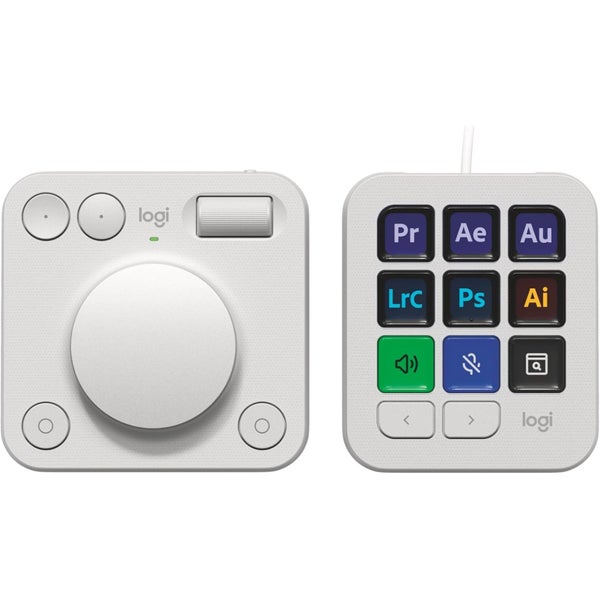
SHORTCUT TO MASTERY Master your creative workflow, and focus on your creation with MX Creative Console. Access editing tools and actions effortlessly with the customizable LCD display keypad and take control with precise tactile analog controls on the wireless dialpad.
SUPERCHARGE YOUR CREATIVE WORKFLOW MX Creative Keypad gives you quick access to all the tools, shortcuts, and actions you need from your favorite applications with recommended profiles that let you get started right away on LCD display keys, or fully customize it to fit your own workflow and style.
FEEL, FOCUS, CONTROL Precise tactile analog controls on the Creative Dialpad lets you connect with your creative workflow. Make precise adjustments with an aluminum low-friction dial, navigate and adjust with a smooth roller, and access shortcuts with customizable keys.
CREATE THE WAY YOU WANT Customize MX Creative console to fit your entire creative workflow. Through the Logi Options+ App, get access to recommended profiles, shortcuts, and actions that you can assign to up to 15 keypad pages per app. You can also personalize the Creative Keypad and use your own custom icons to assigned keys.
SEAMLESSLY INTEGRATED WITH YOUR FAVORITE APPS Instantly access actions and tools for apps such as Adobe Photoshop, Adobe Premiere Pro, Adobe Illustrator, Adobe Photoshop Lightroom Classic, Spotify, Zoom, and many more.
EXPAND YOUR CAPABILITIES ON MARKETPLACE Find a growing library of free plugins, profiles, and more for you to try out through the marketplace on Logi Options+ App.
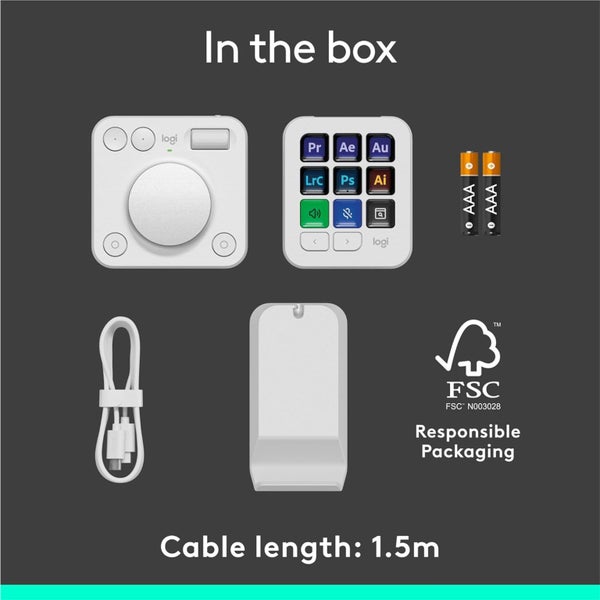
- Battery: MX Creative Dialpad: X2 AAA batteries (Alkaline Batteries)
- MX Creative Keypad: USB C to C high-speed 2.0 cable (150cm)
Required software
- Logi Options+ App
What you need
- Windows 10 or later, macOS 13 or later, USB-C Port, Bluetooth Low Energy Technology, Logi Options+ App
Warranty
- 2 Year Return To Base Warranty
Details
Shipping & pick-up options
| Destination & description | Price | |
|---|---|---|
| Shipping to Auckland Metro | $6.99 | |
| Shipping to North Island Metro & Auckland Rural | $14.99 | |
| Shipping to South Island and all Rural (excl AKL) | $19.99 | |
| Combine Shipping, If Already Paid Highest Shipping | $2.99 | |
| Pickup from Albany - Please check with store first | $0.00 | |
| Pickup from Epsom - Please check with store first | $0.00 | |
| Pick-up available from Auckland City, Auckland | Free | |
Payment Options
Pay instantly by card, Ping balance or saved bank account.
Four fortnightly interest-free payments.
Cash
Questions & Answers (3)
Our promotional offers vary between Trademe and our website, with frequent updates on both platforms. Seller comment Friday, 30 January 2026 We strive to fulfill most orders within 1-2 working days, or you may conveniently collect your purchase from our Albany store or Epsom office. However, occasional delays may occur due to various factors, such as upgrades, stock transfers, or courier-related delays. Please contact us if you have any concerns or specific requirements. Seller comment Friday, 30 January 2026 We kindly ask that you review our Terms and Conditions prior to making a bid or purchase, as these are a fundamental part of the sales and purchasing agreement. If you have any concerns or questions about these terms, please do not hesitate to contact us. We may be able to create a tailored sales agreement to better suit your requirements. Seller comment Friday, 30 January 2026
Logitech MX Creative Console - Pale Grey
Am I covered by Buyer Protection?
When you make a purchase using Card, Direct Debit, Ping balance or Afterpay we are able to protect your trade under our Buyer Protection policy, up to $2,500.
Learn more about Trade Me's Buyer Protection.
About the store
justlaptops
100% positive feedback( 13932