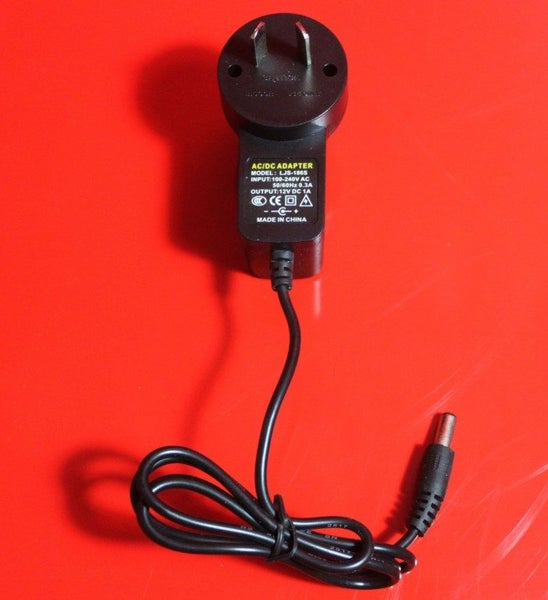


Description
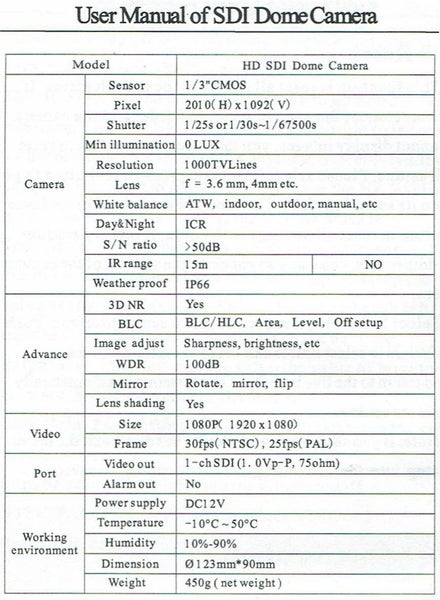
User Manual of SDI Dome Camera User Manual of SDI DomeCamera ?HD-SDI video output .When the back of the captured object is bright,user can set High Light Control (HLC) up backlight compensation for the captured object to make it .Mask and compensate the high light areas so as to make more clearer. right exposure selection. ?Motion Detection ?DNR .When the camera captures the moving object in the Under low illumination condition,user can reduce noise detection area,it will send signal.So it is easy for users to from brightness and color signal to save a lot of storage room. monitor the live. ?OSD .The setup menu clearly displays the functions and features of 1.3 Direction Key and Connector the camera and 3 languages can be selected.It is easy for users to set up the corresponding items. ?ICR Switch The camera provides two operation modes:color and B&W.User can increase sensitivity in low light conditions Open the housing of the camera by screwdriver and find the black button.Please refer to the above picture.Push the button up to (night)by switch to B&W mode.Color mode is preferred in make the cursor move up.Push the button down to make the normal lighting condition(Day) cursor move down.Push the button to the left or right to ?Privacy Masking select the left or right item.Press the button to confirm the selection. When there are not necessary for some area to display in the screen,user can mask this area. A Backlight Compensation (BLC)
Details
Shipping & pick-up options
| Destination & description | Price per item | |
|---|---|---|
| To be arranged | N/A | |
| Pick-up available from Auckland City, Auckland | Free | |
Payment Options
Pay instantly by card and Ping balance.
Cash
Questions & Answers
CCTV Camera
Am I covered by Buyer Protection?
When you make a purchase using any Ping payments like Card or Balance, or Afterpay we are able to protect your trade under our Buyer Protection policy, up to $5,000.
Learn more about Trade Me's Buyer Protection.